Roles and Privileges Guide
User Guide
BriefSpec
1. Introduction
Roles and Privileges control who can see and do what in BriefSpec. Every screen, button, and action is governed by a privilege assigned to a role. Understanding this system is essential for tenant administrators, project managers, and anyone responsible for secure access across your organization.
This guide explains roles, privilege levels, conditions, tenant-wide versus project-scoped access, and how to configure roles without breaking user workflows. Detailed feature key references are in the Appendix.
2. Why Roles and Privileges Matter
What privileges protect
- Tenant data – clients, users, subscription settings, and organization-wide configuration.
- Project workspaces – backlog, defects, test cases, plans, boards, documents, and more.
- Administrative actions – creating roles, assigning users, resetting defaults, managing plans.
What happens when privileges are wrong
- Users cannot see menus or buttons they need (too restrictive).
- Users see controls they should not use (too permissive).
- Project teams experience inconsistent access when tenant roles and project overrides conflict.
Privileges are evaluated from feature keys returned by the platform API, not from job titles hardcoded in the application.
3. Key Concepts
Role
A named collection of privileges (for example Application Admin, Project Manager, Tester, Client User). Roles can be system-provided or custom-created by your tenant.
Privilege
The access level assigned to a role for a specific feature key.
Feature key
A stable identifier such as view-backlog, add-client, or settings-role-privileges. The application uses feature keys exclusively to show, hide, or disable UI controls.
Privilege level
- Hidden – feature and controls are not shown.
- Read Only (Read) – user can see the feature but cannot change data or submit actions.
- Read and Edit (ReadAndEdit) – user can fully interact with the feature.
Condition
- All – privilege applies to all records in scope.
- Own – privilege applies only to records the user owns, created, or is assigned to (semantics vary by module).
When permission is Hidden, condition is always All.
Scope
- Tenant scope – organization-wide (Clients, Users, Settings, Projects list).
- Project scope – inside a specific project (Backlog, Defects, Test Cases, etc.).
4. System Roles vs Custom Roles
System roles (built-in)
Shipped by BriefSpec and synchronized to every tenant. Identified by a link to a master role (master_role_id is set). System role names cannot be renamed or deleted in the tenant UI.
- Tenant (internal) roles: Application Admin, Project Manager, Developer, Tester.
- Client (external) roles: Client User, Client Reviewer, Client Tester.
Legacy names may appear in older documentation: Test Admin is now Application Admin; Author is now Developer; Client Approver is now Client Reviewer.
Custom roles
Created by your tenant under Settings > Role Privileges. Custom roles have no master role link. You can rename, delete (if unused), and fully configure privileges subject to plan limits.
Inactive roles
Roles marked inactive remain visible in the role list with an Inactive indicator but cannot be selected for privilege editing or user assignment.
5. Three Layers of Access Control
Layer 1 – Tenant role
Assigned on the Users screen when adding or editing an organization user. Defines default privileges across the tenant and baseline project access.
Layer 2 – Project role
Assigned on a project’s Users tab. Uses the same tenant role catalog but applies project-scoped privileges when the user works inside that project.
Layer 3 – Per-user project overrides
Optional exceptions for one user on one project. Opened from Project Admin > Project Users > Manage role privileges (shield icon). Overrides sit on top of the project role for specific feature keys.
Effective access in a project = project role privileges, merged with any user-specific overrides. The API returns effective_privilege_level when both role_id, project_id, and user_id are supplied.
6. Accessing Role Privileges
Primary path
- Sidebar > Settings (gear icon).
- Settings landing page > Role Privileges card.
- Route: /{tenant}/{user}/{id}/role-privileges.
Breadcrumb: Home > Settings > Role Privileges.
Prerequisites
- The settings-role-privileges privilege must not be Hidden for your role.
- If Hidden, the Role Privileges card does not appear on Settings and you cannot open the screen.
Related access points
- Users – assign tenant role to organization users.
- Project > Users – assign project role and open per-user override dialog.
- Manage Plan – subscription limits affecting custom roles (separate privilege).
7. The Role Privileges Screen
The screen uses a three-panel layout: Roles (left), Modules (center), and Privileges (right).
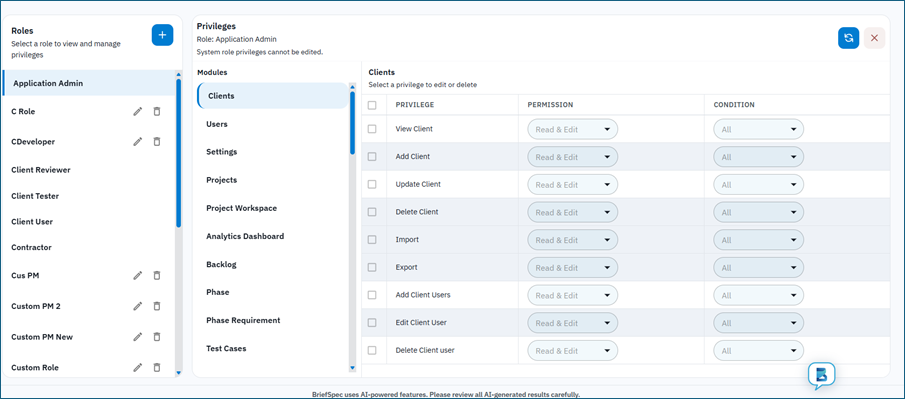
Roles panel (left)
- Lists all tenant roles – system and custom, active and inactive.
- Add (+) creates a new custom role.
- Pencil icon renames custom roles only.
- Trash icon deletes custom roles only (when not assigned to users).
Modules panel (center)
- Lists functional modules (Clients, Users, Backlog, Defects, etc.).
- Modules not included in your subscription plan may be hidden from this list.
Privileges panel (right)
- Table of features for the selected module and role.
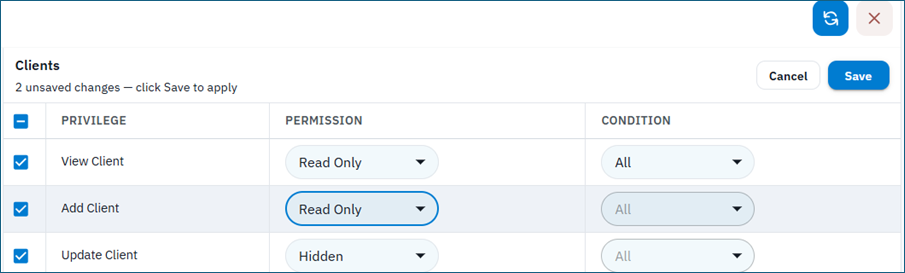
- Permission column: Read & Edit, Read Only, or Hidden.
- Condition column: All or Own (disabled when Hidden). Permission options are labeled Read & Edit, Read Only, and Hidden.
- Edit one or more rows (multi-select supported), then click Save. The panel shows N unsaved changes – click Save to apply (or Cancel). Saving may open Confirm Privilege Update when dependency rules auto-update related privileges.
Reset to Default
Top action resets all tenant role privileges and user overrides for the tenant back to platform master defaults. Requires confirmation. Use with caution.
8. Creating and Managing Roles
Create a new custom role
- Click Add (+) in the Roles panel.
- Choose Create New (empty privilege set) or Clone from Existing (copies privileges from selected role).
- Enter Role Name and click Create.
- New custom roles start with privileges as defined by the clone source or platform defaults.
Rename a custom role
- Click pencil icon next to role name, edit inline, confirm save.
- System role names cannot be changed.
Delete a custom role
- Click trash icon; confirm deletion.
- Blocked if users are still assigned to the role.
- System roles cannot be deleted.
Plan limit
Subscription plan metric no_of_add_custom_roles limits how many custom roles you can create. When exceeded, creation is blocked with a contact-sales message.
9. Configuring Privileges
Steps
- Select a role in the Roles panel.
- Select a module in the Modules panel.
- For each feature row, set Permission (Read & Edit / Read Only / Hidden) and Condition (All / Own). Select rows as needed, then click Save to apply.
- Changes persist when you click Save. Related privileges may be auto-updated after you confirm in the Confirm Privilege Update dialog.
System role editing
Built-in (system) roles are read-only on the privilege table in the current product UI (System role privileges cannot be edited). You can view system role privileges and clone them into custom roles. Plan flag customize_privileges_for_system_roles may exist for future use, but the Role Privileges screen currently locks system roles.
Application Admin self-protection
For the Application Admin role, the Settings > Role Privileges feature row is locked at Read & Edit / All. Administrators cannot remove their own access to role management through the UI.
Granular Role Privileges module keys
The Role Privileges module itself has feature keys: role-privileges-view, role-privileges-add-role, role-privileges-update-role, role-privileges-delete-role, role-privileges-update-permission, role-privileges-update-condition.
10. Assigning Tenant Roles to Users
Path
- Sidebar > Users > Add User or Edit User.
- Role dropdown lists active tenant roles.
- Save assigns role_id to the user subscription record.
Required privileges on Users module
- users-view – access Users screen.
- add-users, update-users, delete-users – respective actions.
- update-users – required to change a user’s tenant role.
Effect
After save, the user’s tenant privilege map reloads on next session or when privileges are refreshed. If you edit privileges for the role you are currently logged in as, the Role Privileges page refreshes privileges automatically.
11. Project Roles and Per-User Overrides
Assign project role
- Open a project > Project Admin > Project Users.
- Add user or change Role column to a tenant role from the dropdown.
- Requires view-projects-users and edit-role-projects-users privileges.
Manage role privileges (overrides)
- Click Manage role privileges (shield) on a Project Users row.
- Dialog shows project-scoped modules only (for example Backlog, Phase, Boards, Plan, Defects — not Documents or Time Entry overrides).
- Displays base (role) value, override value, and effective value per feature.
- Save writes tenant-user-feature-overrides for that user and project.
- Clearing an override restores the project role default.
- Requires projects-users-manage-privileges.
When to use overrides
- Temporary exception for one user on one project (e.g. hide delete-backlog for a client reviewer on a single engagement).
- Prefer creating a dedicated role and cloning privileges when many users need the same pattern.
12. How the Application Enforces Privileges
UI enforcement pattern
- Hidden or null – control is not rendered.
- Read Only – control appears but is disabled or non-actionable.
- Read & Edit – control is fully active.
Sidebar and Settings cards
Settings cards use settings-* feature keys. A card is hidden when its privilege is Hidden. The Settings menu itself appears when at least one settings feature is visible.
Route protection
Some routes use RoleProtectedRoute with a required feature key (for example Manage Plan). If privilege is Hidden after the map loads, the user is redirected.
Project modules
Project screens load projectPrivileges with project_id and user_id. They prefer effective_privilege_level over privilege_level. Condition Own further restricts which rows the user can act on within a module.
Important principle
Decisions use feature_key from the API only – not role name strings. Two users with different role names may have identical privileges if configured that way.
13. Privilege Levels and Conditions in Depth
Hidden
- User does not see menu items, tabs, buttons, or routes tied to the feature.
- Backend denies create/update/delete for that feature.
Read Only
- User can navigate and view data.
- Add, Edit, Delete, Import, and similar actions are disabled.
- Useful for auditors, client reviewers who must see but not change records.
Read & Edit
- Full interaction including create, update, delete where the module supports it.
Condition: All
Privilege applies to every record the user can access in that module and scope.
Condition: Own
Privilege applies only to records the user created, owns, or is assigned to. Used on features such as own-projects-projects, and enforced in Plan, Boards, Documents, Service Requests, and Backlog modules. Even with Read & Edit, the user cannot act on others’ records when condition is Own.
14. Plan and Subscription Limits
no_of_add_custom_roles
- Maximum custom tenant roles you can create.
- Typical tiers: Free 0, Professional 5, Business 10, Enterprise 20 (confirm on your plan).
customize_privileges_for_system_roles
- Listed on some plans for future use. The Role Privileges UI currently locks system role privilege tables (System role privileges cannot be edited) regardless of this flag. Clone a system role to customize.
- In the current product, treat system roles as view-only for privileges. Use Clone from Existing to create an editable custom role.
Module entitlements
Plan module_* keys (module_plan, module_backlog, module_boards, etc.) hide modules from the Role Privileges module list when not subscribed.
Other plan interactions
- test_case_library_module – Testcase Library settings card.
- configure_own_openai_key – OpenAI Key settings card.
Role Privileges page refreshes plan utilization after create/delete role.
15. Built-in Protections and Restrictions
- System roles: no rename, no delete.
- Custom roles with assigned users: cannot delete until users reassigned.
- Application Admin: cannot remove own Role Privileges access via UI lock.
- Hidden permission forces condition All on save.
- Inactive roles: not selectable for editing or assignment.
- Business rules beyond RBAC still apply (e.g. cannot delete client with active projects).
- Reset to Default affects entire tenant privilege matrix and user overrides.
16. Common Workflows
Define a new delivery role
- Clone from Project Manager or similar system role.
- Adjust project module privileges (Backlog, Defects, Test Cases).
- Assign tenant role on Users screen or project role on Project Admin > Project Users.
Give read-only portfolio access
- Set view-* features to Read Only or Read & Edit with condition All.
- Set add-*, edit-*, delete-* features to Hidden or Read Only.
Restrict one user on one project
- Project Admin > Project Users > Manage role privileges > override specific features to Hidden or Read Only.
Recover from misconfiguration
- Reset to Default (tenant-wide) or clone a known-good role and reassign users.
17. Troubleshooting
- Role Privileges card missing – settings-role-privileges is Hidden for your role.
- Cannot edit system role privileges – system roles are locked in the UI (System role privileges cannot be edited). Clone to a custom role to customize.
- Cannot add role – no_of_add_custom_roles limit reached.
- User sees button but it is disabled – privilege is Read Only, not Read & Edit.
- User cannot see expected menu – feature is Hidden or module not on plan.
- Project access differs from tenant access – check project role and user overrides.
- Changes not visible – user may need to refresh; privilege map loads once per session unless refreshed.
See Appendix D for an expanded message glossary.
18. Recommended Practices
- Use descriptive custom role names (e.g. ACME Delivery Lead, Read-Only Auditor).
- Clone from the closest system role rather than starting from empty defaults.
- Prefer role changes over per-user overrides when the pattern applies to many users.
- Document your tenant’s custom roles and who should receive them.
- Test a new role with a pilot user before wide assignment.
- Avoid Reset to Default unless you intend to wipe all tenant privilege customizations.
- Review plan limits before designing a large role library.
- Coordinate with project managers when changing project-scoped privileges mid-engagement.
Appendix
The following appendices provide detailed reference material for Roles and Privileges. Each section identifies its target audience so you can find content relevant to your role.
Appendix A: Quick-Reference Tables
A.1 System Roles Catalog
Target audience: Tenant administrators and security owners defining who receives which built-in role.
Tenant (internal) system roles
- Application Admin – full tenant administration including Settings and Role Privileges.
- Project Manager – delivery and project leadership (privileges configured by platform defaults).
- Developer – authoring and development workflows (formerly Author).
- Tester – test execution and related project access (merged from legacy Test Manager where applicable).
Client (external) system roles
- Client User – external participant with client-scoped access.
- Client Reviewer – review and approval workflows (formerly Client Approver).
- Client Tester – client-side test execution access.
Exact default privileges per role are platform-seeded. System role privilege tables are view-only in the current UI; clone a system role into a custom role to customize.
A.2 Privilege Level and Condition Matrix
Target audience: All administrators configuring roles; support staff explaining UI behavior.
Permission levels
- Hidden – UI hidden; API denies mutating actions.
- Read Only – UI visible, actions disabled (Permission column label: Read Only).
- Read & Edit – UI fully enabled (Permission column label: Read & Edit; API value ReadAndEdit).
Conditions (when not Hidden)
- All – all records in scope.
- Own – only records user owns, created, or is assigned to.
UI mapping
- canView(featureKey) = level is not Hidden and not null.
- canEdit(featureKey) = level is exactly ReadAndEdit (UI: Read & Edit).
A.3 Role Privileges Screen Feature Keys
Target audience: Administrators delegating role-management tasks without granting full Application Admin access.
- role-privileges-view – open Role Privileges screen.
- role-privileges-add-role – create custom roles.
- role-privileges-update-role – rename custom roles.
- role-privileges-delete-role – delete custom roles.
- role-privileges-update-permission – change Permission column.
- role-privileges-update-condition – change Condition column.
A.4 Settings Card Feature Keys
Target audience: Tenant administrators controlling who sees which Settings areas.
- settings-role-privileges – Role Privileges card and screen.
- settings-software-management – Software Management.
- settings-industry-management – Industry Management.
- settings-testcase-library – Testcase Library.
- settings-project-template – Project Templates.
- settings-project-settings – Project Settings.
- settings-manage-subscription-plan – Manage Plan.
- settings-miscellaneous – Miscellaneous reference data.
- settings-openai-key – OpenAI Key.
- settings-logo-changes – Logo Changes.
A.5 Tenant Scope Module Summary
Target audience: Administrators configuring organization-wide access.
Tenant-scoped modules control Clients, Users, Settings, Projects, Projects Users, Software Management, and related administration.
- Clients (9 features)
- Users (6 features)
- Settings (9 features)
- Projects (8 features)
- Projects Users (4 features)
- Test 1 (4 features)
- Reports (4 features)
- Software Management (4 features)
- Pillars Management (8 features)
- Industry Management (4 features)
- Test Case Library (3 features)
- Role Privileges (6 features)
- Miscellaneous (27 features)
- Project Template (4 features)
- Logo Changes (4 features)
- OpenAI Key (3 features)
A.6 Project Scope Module Summary
Target audience: Project managers and delivery leads configuring in-project access.
Project-scoped modules apply when a user works inside a project. Assignment uses project role plus optional overrides.
- Dashboard (1 features)
- Backlog (15 features)
- Phase (7 features)
- Phase Requirement (7 features)
- Test Cases (14 features)
- Test Cycles (6 features)
- Tester Test case list Screen (5 features)
- Test Case Execution Screen (5 features)
- Defects (12 features)
- Action Items (8 features)
- Scribe360 (7 features)
- Traceability (1 features)
Appendix B: Tenant Feature Key Reference
B.1 Clients and Users
Target audience: Client administrators and user administrators.
Clients
- view-client – View Client
- add-client – Add Client
- update-client – Update Client
- delete-client – Delete Client
- import-clients – Import
- export-clients – Export
- add-client-users – Add Client Users
- edit-client-user – Edit Client User
- delete-client-user – Delete Client user
Users
- add-users – Add
- update-users – Update
- delete-users – Delete
- import-users – Import
- export-users – Export
- users-view – View
B.2 Projects and Projects Users
Target audience: Project portfolio managers and project administrators.
Projects
- view-projects – View
- add-projects – Add
- update-projects – Update
- delete-projects – Delete
- reset-projects – Reset
- make-active-projects – Make Active
- own-projects-projects – Own Projects
- start-project-projects – Start Project
Projects Users
- view-projects-users – View
- add-projects-users – Add
- edit-role-projects-users – Edit Role
- change-status-projects-users – Change Status
B.3 Settings, Role Privileges, and Administration
Target audience: Tenant administrators and platform configurators.
Settings
- settings-logo-changes – Logo Changes
- settings-software-management – Software Management
- settings-industry-management – Industry Management
- settings-testcase-library – Testcase Library
- settings-role-privileges – Role Privileges
- settings-miscellaneous – Miscellaneous
- settings-project-template – Project Template
- settings-project-settings – Project Settings
- settings-openai-key – OpenAI Key
Software Management
- software-management-add – Add
- software-management-update – Update
- software-management-delete – Delete
- software-management-view – View
Pillars Management
- pillars-management-add – Add
- pillars-management-update – Update
- pillars-management-delete – Delete
- pillars-management-view – View
- pillars-management-add-module – Add Module
- pillars-management-update-module – Update Module
- pillars-management-delete-module – Delete Module
- pillars-management-view-module – View Module
Industry Management
- industry-management-add – Add
- industry-management-update – Update
- industry-management-delete – Delete
- industry-management-view – View
Role Privileges
- role-privileges-view – View
- role-privileges-add-role – Add Role
- role-privileges-update-role – Update Role
- role-privileges-delete-role – Delete Role
- role-privileges-update-permission – Update Permission
- role-privileges-update-condition – Update Condition
B.4 Libraries, Templates, and Configuration
Target audience: Template owners, library administrators, and branding administrators.
Test Case Library
- test-case-library-view – View
- test-case-library-create-master-testcase – Create Master Testcase
- test-case-library-import-test-case-set – Import Test case set
Miscellaneous
- miscellaneous-view-department – View Department
- miscellaneous-add-department – Add Department
- miscellaneous-update-department – Update Department
- miscellaneous-delete-department – Delete Department
- miscellaneous-add-location – Add Location
- miscellaneous-update-location – Update Location
- miscellaneous-delete-location – Delete Location
- miscellaneous-view-location – View Location
- miscellaneous-add-currency – Add Currency
- miscellaneous-update-currency – Update Currency
- miscellaneous-view-currency – View Currency
- miscellaneous-delete-currency – Delete Currency
- miscellaneous-add-company-size – Add Company Size
- miscellaneous-update-company-size – Update Company Size
- miscellaneous-view-company-size – View Company Size
- miscellaneous-delete-company-size – Delete Company Size
- miscellaneous-add-project-type – Add Project Type
- miscellaneous-update-project-type – Update Project Type
- miscellaneous-delete-project-type – Delete Project Type
- miscellaneous-view-project-type – View Project Type
- miscellaneous-add-solution-type – Add Solution Type
- miscellaneous-update-solution-type – Update Solution Type
- miscellaneous-delete-solution-type – Delete Solution Type
- miscellaneous-add-revenue – Add Revenue
- miscellaneous-update-revenue – Update Revenue
- miscellaneous-delete-revenue – Delete Revenue
- miscellaneous-view-revenue – View Revenue
Project Template
- project-template-view – View
- project-template-add – Add
- project-template-delete – Delete
- project-template-update – Update
Logo Changes
- logo-changes-view – View
- logo-changes-add – Add
- logo-changes-delete – Delete
- logo-changes-update – Update
OpenAI Key
- openai-key-view – View
- openai-key-add – Add
- openai-key-update – Update
B.5 Reports and Test Modules
Target audience: Reporting administrators (module availability varies by tenant).
Test 1
- test-1-add – Add 1
- test-1-view – View
- test-1-update – Update
- test-1-delete – Delete
Reports
- reports-add – Add
- reports-view – View
- reports-update – Update
- reports-delete – Delete
Appendix C: Project Feature Key Reference
C.1 Dashboard, Backlog, and Phases
Target audience: Business analysts, phase leads, and backlog owners.
Dashboard
- view-analytics-dashboard – View
Backlog
- view-backlog – View
- add-from-sow – Add from SOW
- create-from-transcript – Create from transcript
- create-from-import – Create from import
- create-from-manual – Create From manual
- update-backlog – Update
- delete-backlog – Delete
- export-backlog – Export
- assign-for-review – Assign for Review
- approve-reject – Approve/Reject
- smart-merge – Smart Merge
- backlog-ai-fit-gap-analysis – AI Fit-Gap Analysis
- backlog-ai-parent-child-linkage – AI Parent-Child Linkage
- regenerate – Regenerate
- comments-backlog – Comments
- attachment-backlog – Attachment
- activity-backlog – Activity
Phase
- add-phase – Add
- update-phase – Update
- delete-phase – Delete
- executive-summary – Executive Summary
- swimlane-view – Swimlane View
- view-phase – View
- start-phase – Start Phase
Phase Requirement
- add-phase-requirement – Add
- update-phase-requirement – Update
- delete-phase-requirement – Delete
- assign-for-review-phase-requirement – Assign for Review
- approve-reject-phase-requirement – Approve/Reject
- generate-test-cases – Generate Test cases
- view-phase-requirement – View
C.2 Testing Modules
Target audience: Test managers, testers, and QA leads.
Test Cases
- view-test-cases – View
- add-test-cases – Add
- edit-test-cases – Edit
- import-test-cases – Import
- export-test-cases – Export
- delete-test-cases – Delete
- clone-test-cases – Clone
- link-de-link – Link/De-link
- regenerate-test-cases – Regenerate
- comments-test-cases – Comments
- attachment-test-cases – Attachment
- activity-test-cases – Activity
- test-cases-create-with-ai – Create With AI
- test-cases-create-manually – Create Manually
Test Cycles
- view-test-cycles – View
- add-test-cycles – Add
- delete-test-cycles – Delete
- edit-test-cycles – Edit
- create-client-testers – Create Client Testers
- testers-execution-list – Testers Execution List
Tester Test case list Screen
- resume-tester-test-case-list-screen – Resume
- start-tester-test-case-list-screen – Start
- restart-tester-test-case-list-screen – Restart
- view-linked-defects – View Linked Defects
- assign-reassign-testers – Assign/Reassign Testers
Test Case Execution Screen
- save-progress – Save Progress
- add-feedback – Add feedback
- add-attestation – Add Attestation
- create-defect – Create Defect
- download-instruction – Download Instruction
C.3 Defects, Action Items, and Traceability
Target audience: Defect managers, action item owners, and traceability users.
Defects
view-defects – View
add-defects – Create Manually
edit-defects – Edit
assign-user – Assign User
import-defects – Import
download-defects – Download
delete-defects – Delete
comments-defects – Comments
attachment-defects – Attachment
activity-defects – Activity
defects-create-with-ai – Create With AI
defects-regenerate-with-ai – Regenerate With AI
Action Items
view-action-items – View
add-action-items – Add
edit-action-items – Edit
delete-action-items – Delete
assign-user-action-items – Assign User
comments-action-items – Comments
attachment-action-items – Attachment
activity-action-items – Activity
Scribe360
view-scribe360 – View
add-scribe360 – Add
edit-scribe360 – Edit
delete-scribe360 – Delete
scribe360-add-article-style – Add Article Style
scribe360-add-job-aid-style – Add Job Aid Style
scribe360-add-short-instructions – Add Short Instructions
Traceability
view-traceability – View
C.4 Additional Project Modules (platform catalog)
Target audience: Administrators on tenants with extended module subscriptions.
These modules may appear in Role Privileges when enabled on your plan. Feature keys are defined in the platform master catalog:
Plan
plan-view, plan-add, plan-update, plan-delete, plan-import, plan-export, plan-comments, plan-activity, plan-attachments, plan-add-sub-task, plan-create-plan-from-sow, plan-create-phase-from-plan, plan-view-leave-calendar, plan-edit-leave-calendar.
Boards
board-view, board-add, board-update, board-delete, board-view-list, board-add-edit-list, board-delete-list, board-add-edit-card, board-delete-card, board-view-card-details, board-cards-comments, board-cards-attachments, board-edit-themes.
Documents
documents-view, documents-add, documents-update, documents-delete, documents-download, documents-activity. (Tenant Role Privileges matrix; not available in Project Users override allowlist.)
Service Requests
service-requests-view, service-requests-add, service-requests-update, service-requests-delete, service-requests-assign-user, service-requests-comments, service-requests-attachments, service-requests-activity, service-requests-time-entry, service-requests-import, service-requests-download, service-requests-create-with-ai, service-requests-regenerate-with-ai, service-requests-resolution.
Time Entry
time-entry-view, time-entry-add, time-entry-update, time-entry-delete, time-entry-approve-entries, time-entry-mark-as-invoiced. (Tenant matrix; not in Project Users override allowlist. Service Requests also has service-requests-time-entry.)
Financials / Financial Plan
financials-view, financials-add, financials-update; financial-plan-view, financial-plan-add, financial-plan-update (when Budgeting / financial modules are on the plan).
Key Decisions
view-key-decisions, add-key-decisions, update-key-decisions, delete-key-decisions, key-decision-comments, key-decision-activity, key-decision-assigne.
RAID Logs
raid-logs-view, raid-logs-add, raid-logs-update, raid-logs-delete, raid-logs-comments, raid-logs-activity.
C.5 Privilege Keys for Project User Management
Target audience: Project administrators assigning users and overrides.
view-projects-users – view Project Users tab.
add-projects-users – add user to project.
edit-role-projects-users – change project role dropdown.
change-status-projects-users – activate/deactivate user on project.
projects-users-manage-privileges – open Manage role privileges override dialog.
Appendix D: Workflows, Limits, and Troubleshooting
D.1 Scenario Playbooks
Target audience: Tenant administrators and project managers executing common RBAC tasks.
Playbook 1: Onboard a new organization role
1. Settings > Role Privileges > Add role > Clone from closest system role.
2. Adjust tenant and project module privileges.
3. Assign on Users (tenant-wide) or Project Users (project-specific).
4. Pilot with one user; expand after validation.
Playbook 2: Read-only auditor
1. Clone Application Admin or Project Manager.
2. Set all add/edit/delete/import keys to Hidden or Read Only.
3. Keep view-* keys at Read & Edit or Read Only as needed.
Playbook 3: Single-project exception
1. Keep tenant role unchanged.
2. Project Admin > Project Users > Manage role privileges.
3. Override specific features; document reason and expiry.
Playbook 4: Recover from misconfiguration
1. Clone a known-good role and reassign users, OR
2. Reset to Default (tenant-wide – destructive to customizations).
D.2 Pre-Assignment Checklist
Target audience: Administrators before assigning a new or changed role to production users.
Role name and purpose documented.
Tenant vs project assignment path confirmed.
Critical Hidden keys verified (delete-*, settings-*, role-privileges-*).
Own vs All conditions reviewed for portfolio-scoped features.
Pilot user tested on representative project.
Plan limits not exceeded (custom role count).
Stakeholders notified if reducing access mid-engagement.
D.3 Plan Limits Glossary
Target audience: Tenant administrators and subscription owners.
no_of_add_custom_roles – caps custom role creation.
customize_privileges_for_system_roles – enables editing built-in role privilege matrices.
module_* plan keys – hide modules from Role Privileges module list when not subscribed.
D.4 Error and Message Glossary
Target audience: All users and support staff diagnosing access issues.
Role Privileges card not visible – settings-role-privileges is Hidden.
Cannot add role / plan limit – no_of_add_custom_roles exceeded.
System role privileges read-only – system roles are locked in the UI (clone to customize).
Cannot delete role – users still assigned or role is system-built-in.
Button visible but disabled – privilege is Read Only, not Read & Edit.
404 on protected route – required feature key is Hidden.
User lacks project action – check project role, overrides, and Own condition.
Reset to Default confirmation – warns that tenant overrides will be lost.
Appendix E: Access Model and Terminology
E.1 Effective Privilege Resolution Order
Target audience: Technical administrators and support engineers explaining why effective access differs from role defaults.
Inside a project
1. Resolve user’s project role (TenantUserRole with project, else tenant-wide role).
2. Load RoleFeaturePrivilege – project row if present, else tenant row.
3. Apply UserFeaturePrivilegeOverride for that user + project + feature.
4. Evaluate condition (All vs Own) in module-specific rules.
5. UI uses effective_privilege_level when provided by API.
Tenant-wide (no project context)
1. Resolve role from user subscription role_name or tenant-wide TenantUserRole.
2. Load tenant-level RoleFeaturePrivilege (project is null).
3. Return privilege_level and condition for feature key.
E.2 Legacy Role Name Mapping
Target audience: Administrators migrating documentation or comparing to older BriefSpec releases.
Test Admin / TestAdmin -> Application Admin / ApplicationAdmin
Author -> Developer
Test Manager -> Tester (merged)
Client Approver -> Client Reviewer
sSupport Representative -> Tester (removed)
User records and subscriptions may still store canonical names; the UI displays friendly labels.
E.3 Sample Role Configurations (Illustrative)
Target audience: Tenant administrators designing Role Privileges. Examples only – adjust to your organization.
Application Admin (system)
Broad Read & Edit on tenant and project modules; full Settings access.
Read-Only Portfolio Viewer (custom)
view-client, view-projects, view-backlog: Read & Edit or Read Only; all mutate keys Hidden.
Project Manager (system)
Strong project module access; limited Settings; typically no Role Privileges management.
Client Reviewer (system)
Backlog/phase review features; limited delete; client-appropriate visibility.
E.4 Glossary
Target audience: All readers new to BriefSpec RBAC terminology.
Feature key – stable permission identifier (e.g. view-defects).
Privilege level – Hidden, Read, or ReadAndEdit.
Condition – All or Own scope qualifier.
Tenant role – organization-wide role on Users screen.
Project role – same role catalog applied on Project Admin > Project Users.
Override – per-user, per-project exception to project role.
System role – built-in role linked to master_role_id.
Custom role – tenant-created role with master_role_id null.
Master catalog – platform-wide default roles and features (not edited in tenant UI).
Effective privilege – final level after overrides merged.
Appendix F: Advanced Reference
F.1 Cognito Groups vs Tenant Roles
Target audience: Platform operators and senior administrators understanding authentication vs authorization.
BriefSpec uses two related layers. Cognito UserGroups provide coarse API gatekeeping at login. Tenant roles and feature privileges provide fine-grained screen and action control.
At login, the platform resolves the user’s role from subscription role_name, TenantUserRole, then Cognito groups.
Custom tenant roles work through TenantUserRole even when not named in hardcoded Cognito group lists.
Document end-user access from feature privileges, not from Cognito group name alone.
F.2 Own Condition Semantics by Area
Target audience: Project managers configuring Own condition; support explaining partial access.
Projects – own-projects-projects limits visibility to user’s projects when configured.
Backlog – ownership uses creator/assignee/reviewer rules in module helpers.
Plan – task ownership determines edit rights when condition is Own.
Boards – card/list ownership determines mutate access.
Documents – document ownership and project membership apply.
Service Requests – assignee and creator rules apply.
When in doubt, pilot Own condition with a test user on a real project record.
F.3 Related Settings Cross-Reference
Target audience: Administrators navigating adjacent configuration screens.
Settings > Role Privileges – this guide.
Settings > Manage Plan – subscription limits affecting roles.
Users – tenant role assignment.
Project > Users – project role and overrides.
Settings > Project Templates – separate from roles; controls module layout not user access.
Settings > Miscellaneous – reference data privileges under miscellaneous-* keys.
F.4 Platform-Only Operations (Not in Tenant UI)
Target audience: BriefSpec platform operators; tenant admins setting expectations.
Create or delete master roles in master catalog.
Bulk seed privilege matrix via platform Excel upload.
sync-master-access-all-tenants – push master defaults to all tenants.
Reset affects tenant data only; master catalog changes are platform-operated.