
In short: This is a practical walkthrough of how a user acceptance testing cycle runs on BriefSpec: preparing the test cases, setting up the cycle, what the testers see during the event, what the PM sees, how defects and retests flow, and what you have in hand when the cycle closes. If you manage UAT events, this guide shows you how to run a cycle that is faster, clearer and fully traceable from start to finish. It is for the people who run these events. If you want the argument for why UAT deserves a real platform, we have written that separately. This one is about the mechanics.
I have sat through more UAT events than I can count, usually as the solution architect in the room while the PM tried to hold the event together with a folder of spreadsheets. The pattern was always the same: test cases in Excel, one sheet per tester, results emailed back whenever the tester got to it, and the PM spending evenings reconciling it all into a picture that was stale by the next morning. BriefSpec was built to run that same event as one connected exercise. Here is how it works, in the order you would actually do it.
The week before: getting the test cases ready
A UAT cycle is only as good as the cases in it, and this is where most of the preparation time goes on a traditional project. BriefSpec shortens it in two ways.
If your organization already has a test case repository, you upload it as it is. BriefSpec supports common formats and sources including Excel files, CSVs, and direct imports from tools such as Jira. The AI maps the columns into BriefSpec’s test case library, and from that point, the platform learns how your organization writes test cases: the level of detail, the step structure, and the way expected results are phrased. That is a one-time step.
New test cases are then generated from the user stories themselves. Select a story and click generate; BriefSpec reads the story, the comments underneath it, and the knowledge in your environment, and drafts the case in your organization’s style. Where the business process spans several stories, select them together, add any context the AI should know, and generate a single end-to-end case. A manual hire that touches core HR, payroll and benefits gets tested the way the business runs it, as one flow, instead of three artificial fragments.
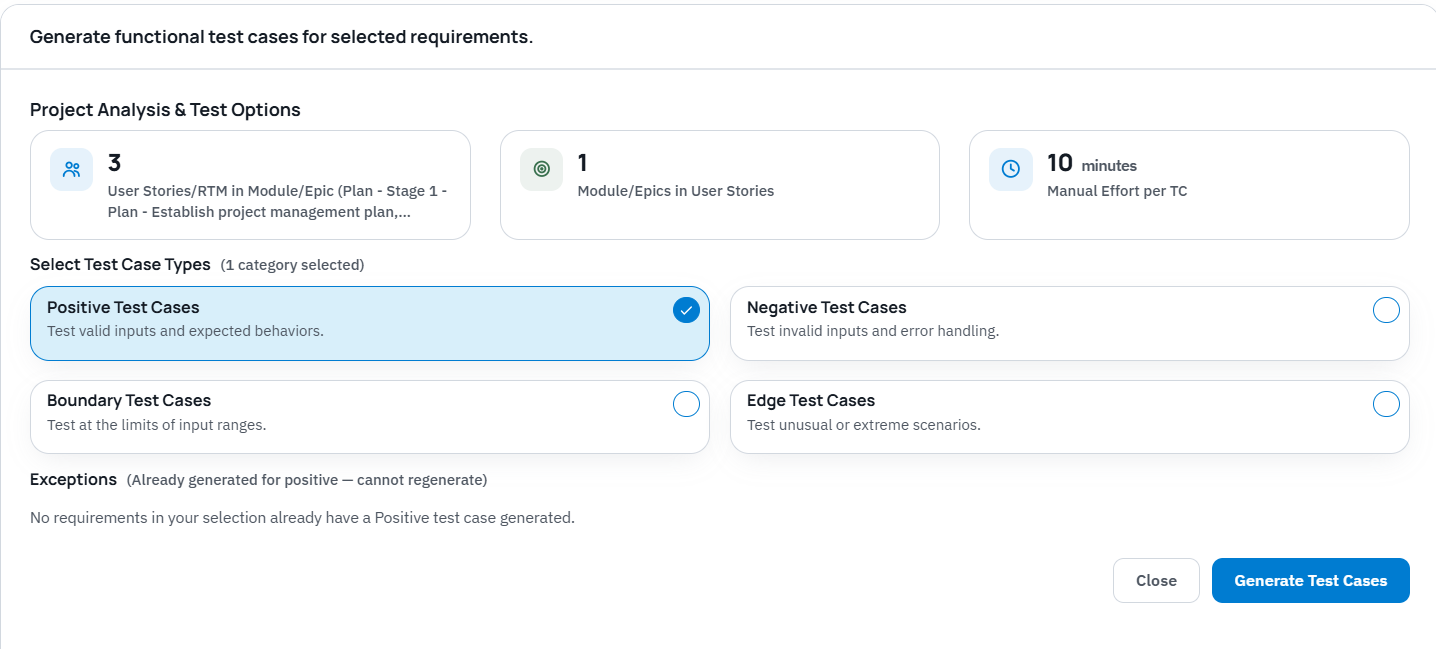
What you notice after the first few dozen cases is less any single clever output and more the consistency. Every case comes out at the same standard, with the same step detail and the same precision in the expected results, whether it was generated on day one or day forty, for the senior consultant’s stories or the new hire’s. The accuracy holds because each case is drafted from the story and the discussion attached to it rather than from someone’s memory of a workshop. And when a scenario calls for it, the generator covers the ground a rushed consultant skips: the negative case where required information is missing, the boundary case at a character limit.
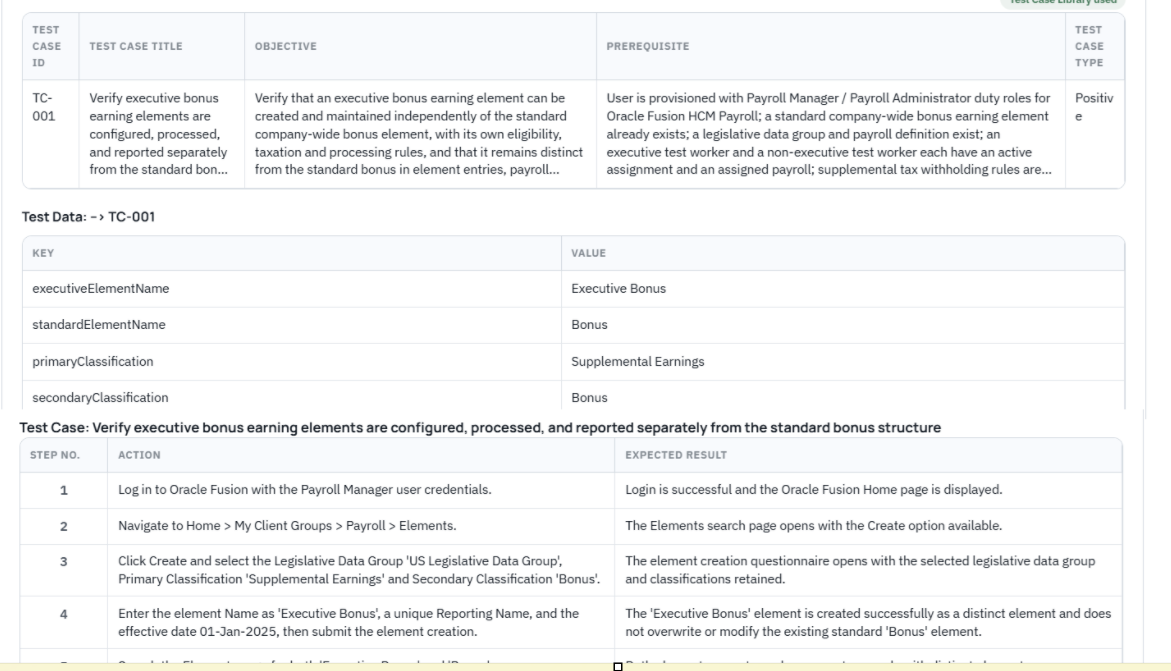
The consultant reviews every generated case before it goes anywhere, and reviewing does not mean editing line by line. If a case needs changes, the consultant tells the generator what to change, all of it at once, in plain language, and regenerates; the case comes back with the changes incorporated. Adjusting ten steps takes about as long as describing what is wrong with them. Once the case reads right, it is published, and only published cases can go into a cycle, which sounds like a small rule until you have watched a tester burn an hour on a half-written draft that should never have reached them.
Setting up the cycle: about an hour
Creating the cycle itself is four decisions.
First, the cycle is tied to a phase. UAT Cycle 1 belongs to the UAT phase, which means it knows which requirements it exists to validate, and its results roll up to phase readiness instead of sitting in a folder.
Second, you define the testing teams the way the business is organized. A payroll team, a benefits team, a core HR team, each with its own internal consultants and customer testers. Customer testers get a dedicated role with cycle-only access through a link, so a business user who joins the project for one week of testing never has to learn the platform. When new testers receive their access link, they are automatically shown a brief onboarding page with instructions for their role, key steps for execution, and tips for using the most important features like passing steps, adding notes, and raising defects. An example walkthrough case is available if they want to practice before starting. Support is on hand through in-platform chat or email if any questions come up. They also cost nothing, however many you invite, which changes the economics of a forty-tester event.
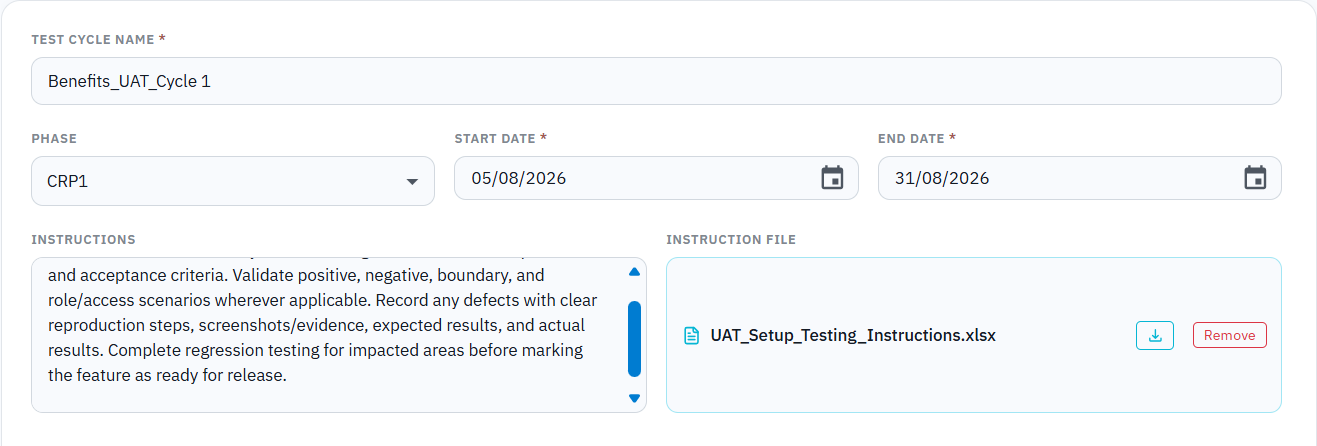
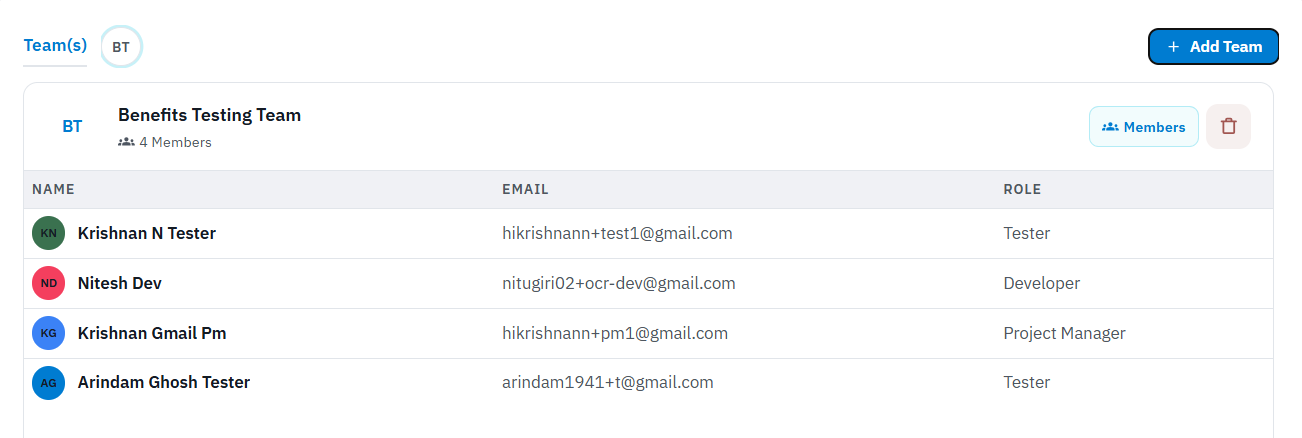
Third, you group the cases the way the event will actually run. A three-day event might put core HR and security on day one, payroll and benefits on day two, integrations and reporting on day three. A tester opening the cycle on day two sees day two’s cases in the order they should be executed, and nothing else.
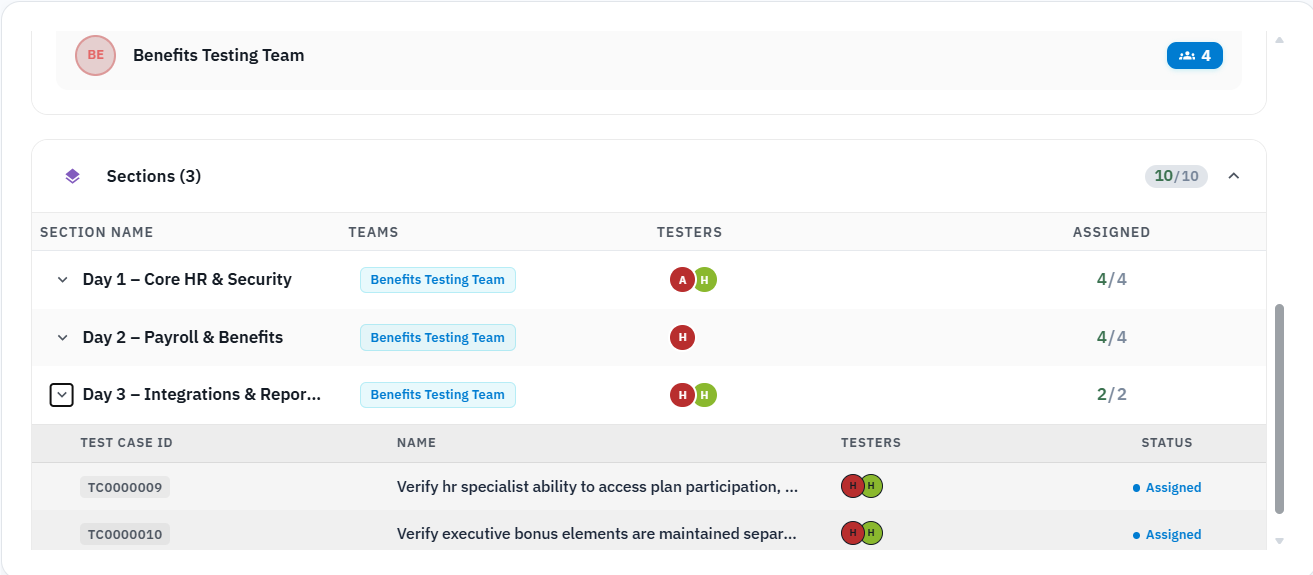
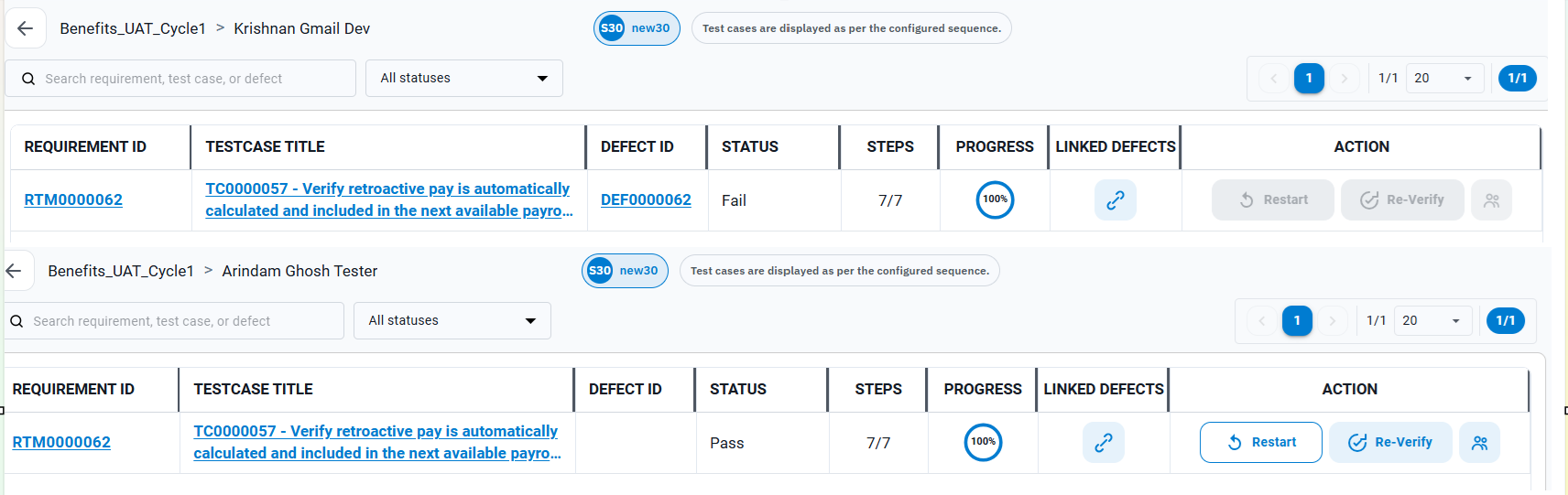
Fourth, you assign the cases, and this is the setting I would ask you to pay attention to: the same test case can be assigned to more than one tester, and every tester’s result is kept separately. The manual hire process gets tested by the HR administrator, the payroll administrator and a manager self-service user, and when the payroll administrator fails what the HR administrator passed, that disagreement is preserved. It is often the most useful finding of the entire cycle. Tools that keep one pass/fail per case and let the last click overwrite the first throw it away.
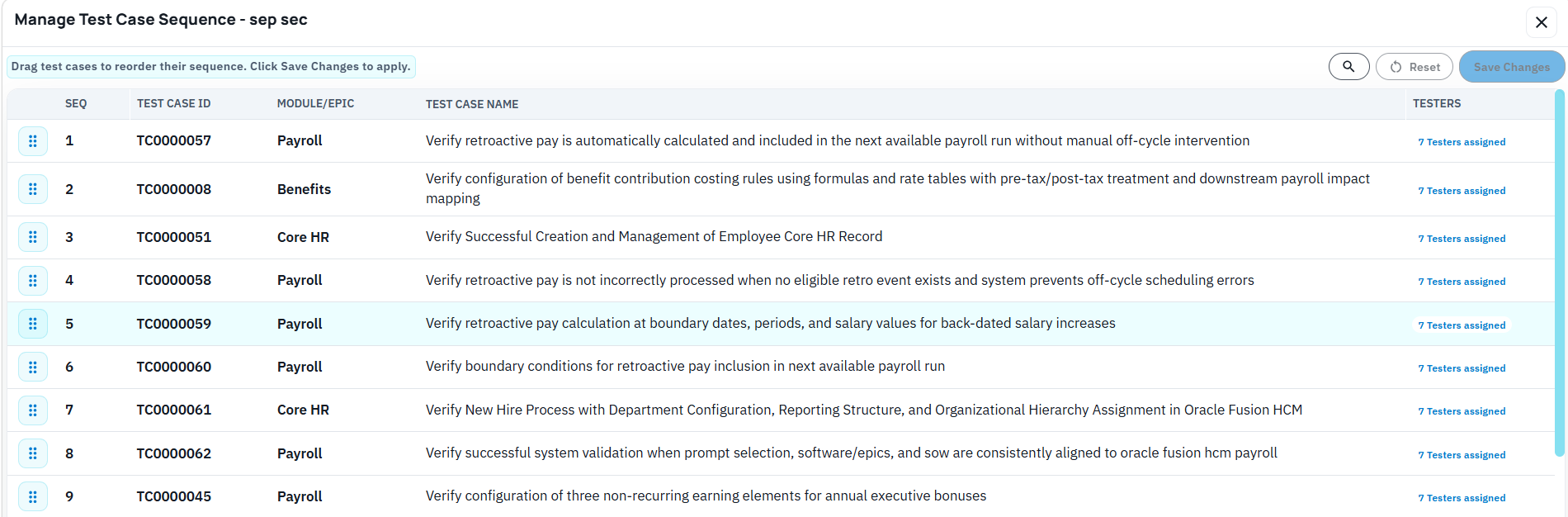
Another important aspect is to be able to manage Test case sequencing. The tool allows you to do this through a simple drag and drop.
Then you launch, and the testers are notified.
During the event: the tester’s day
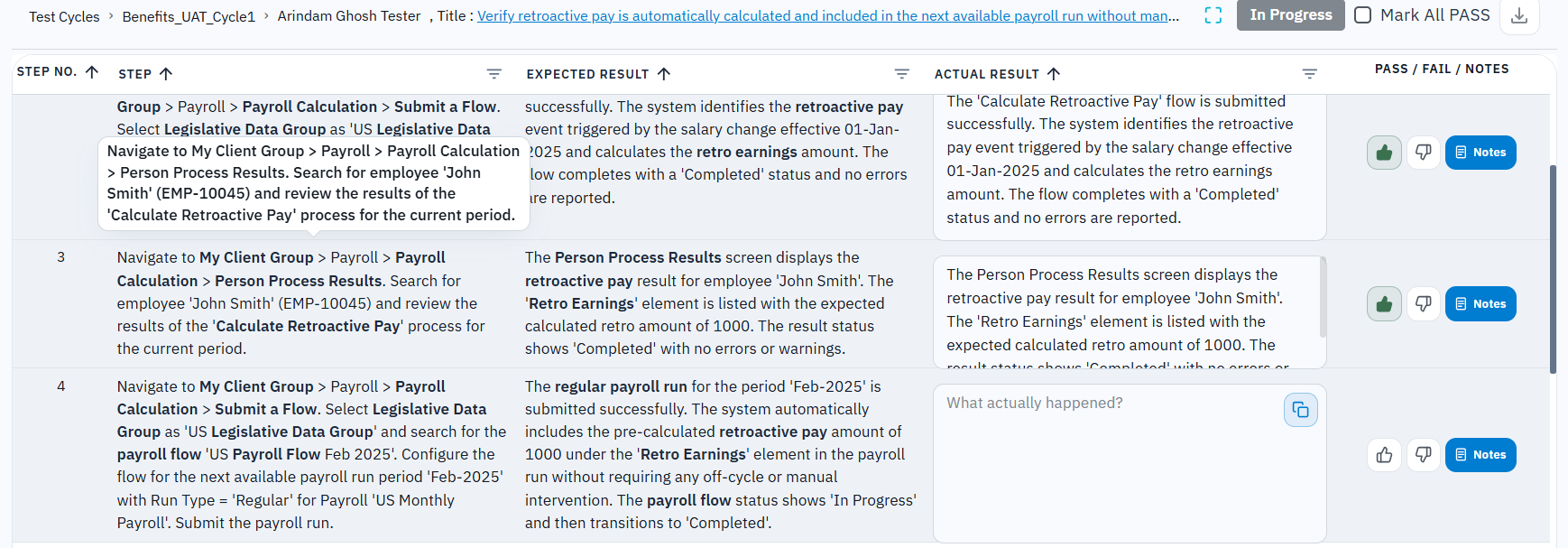
The tester opens their link and sees their cases in sequence. For each step they mark pass or fail, copy the expected result into the actual result instead of retyping it, and add notes or a screenshot at the step where it belongs. There is no spreadsheet to fill in and nothing to email back.
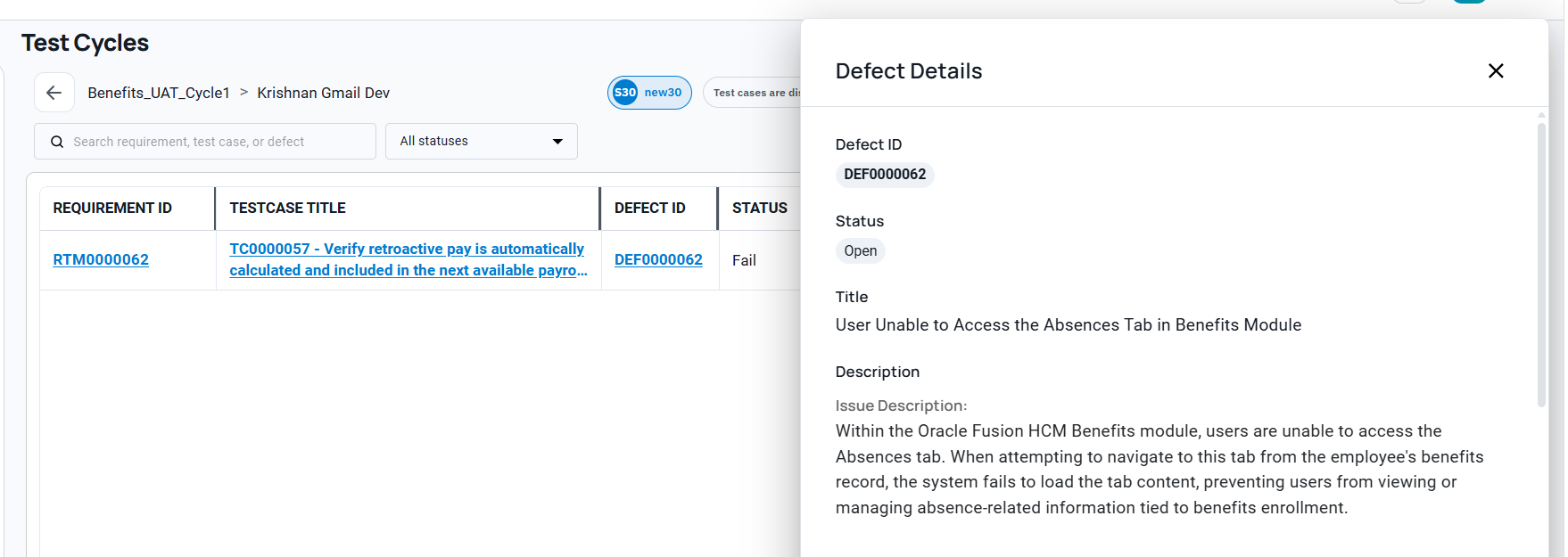
When a step fails, the tester creates the defect right there, choosing whether to speak their description using their device’s microphone or simply type it in. People do not like writing defects; they are usually happy to talk about them, and BriefSpec lets them do either. The tester says or types what happened in as much detail as they want, for example: “the system let me submit the hire without a salary, and salary should be required for this employee type,” and the AI turns that into a structured defect. The defect already knows which test case, which step, which requirement and which cycle it came from, because it was born there. Nobody retypes context, and no defect arrives as a one-line email that takes three follow-ups to understand.
During the event: the PM’s view
While the testers work, the PM watches the cycle move. Who has started and who has not, completion by tester and by section, pass and fail counts, defects raised and their status. When one tester is quietly a day behind, it is visible on day one rather than discovered when their sheet comes back mostly empty. Leadership sees the same live view, which means the Thursday steering question, how is testing going, gets answered by looking rather than by a weekend of reconciliation.
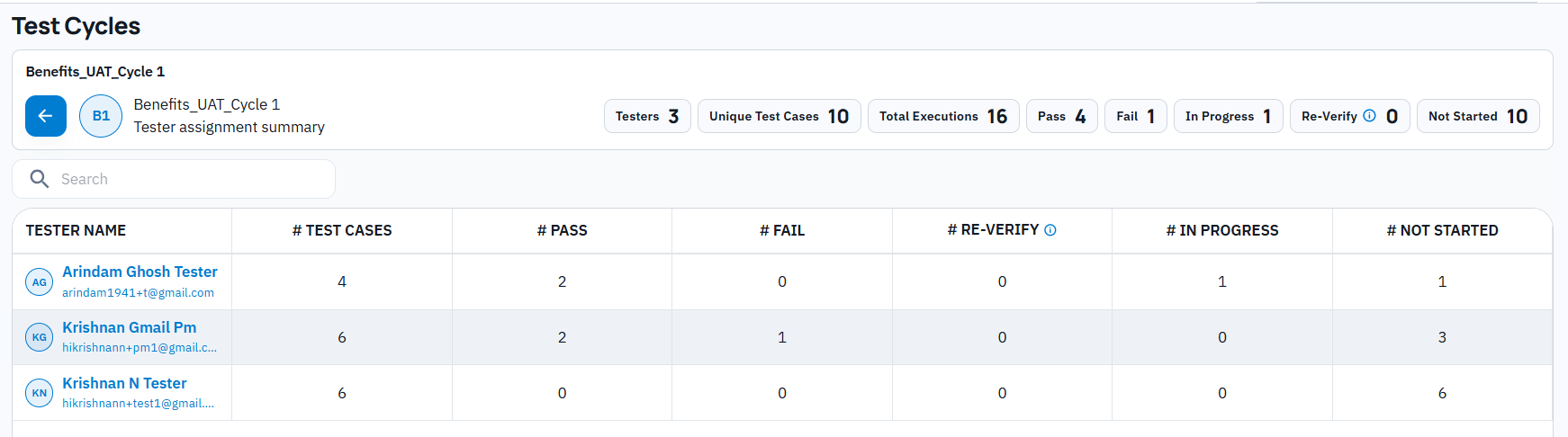
On the projects I worked on, this view is what the PM was manually assembling every night from fourteen spreadsheets. Here it is a by-product of the testers doing their work, which is the way reporting should be produced.
Closing the loop: defects and retests
When a defect is resolved and marked ready for retest, the tester who raised it is notified and asked to retest. The retest result lands against the original case and cycle. That single mechanism replaces the email thread that usually carries this, the one where “is this fixed?” and “can someone recheck?” bounce around until the answer is lost. A defect in BriefSpec is either open, waiting for retest, or confirmed closed by the person who found it, and the cycle shows which.
When the cycle ends
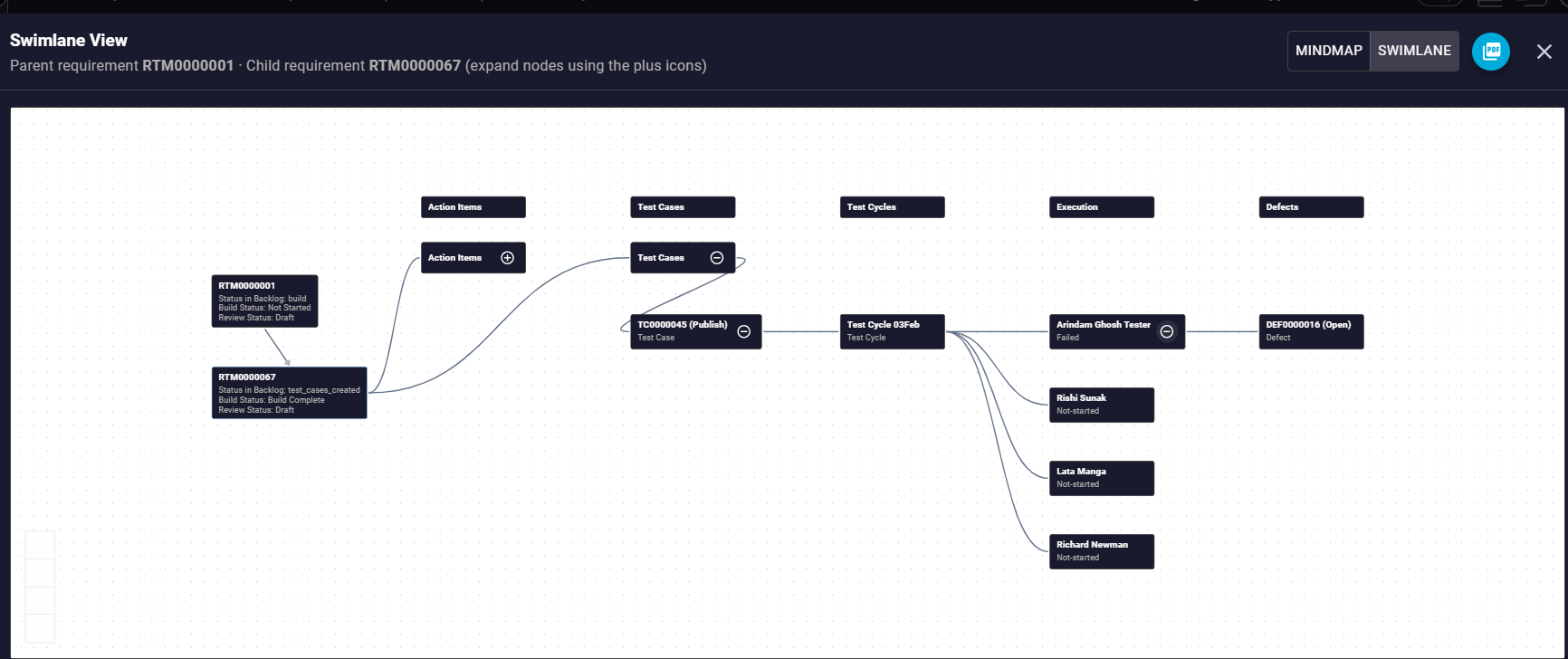
This is the part that pays off months later. Because the cycle was tied to the phase and the cases were linked to requirements, closing the cycle leaves a complete record behind: every requirement in scope for UAT, the cases that validated it, every tester’s result, every defect raised and its resolution, and every retest. All records are stored securely, with role-based access controls and encryption applied to ensure that sensitive information is protected throughout the process. Every action in the cycle is tracked, creating a full audit trail so you can see what was changed, when, and by whom. When the customer asks at go-live whether the payroll requirements were validated, the answer is a view, and it is the same record a steering committee or an auditor would see. Nobody assembles evidence after the fact, because the evidence is the work.
What this adds up to
Four things, once the mechanics are out of the way.
The first is structure. A UAT cycle run this way is a governed project event, with teams, days, assignments, independent results, and live progress, rather than a pile of spreadsheets held together by one PM’s evenings. Most of the advantage in this article comes from that structure, before any AI is involved at all.
The second is that you can start here. A UAT cycle is contained enough to run on BriefSpec while the rest of the project stays wherever it is today. That makes testing the natural way to pilot the platform: run one cycle on one project, compare it against the last cycle you ran on spreadsheets, and decide about the rest of the project afterward. Nothing else has to move for you to find out.
The third is the quality of what gets produced along the way. Test cases come out consistent and accurate rather than varying with whoever wrote them, and the defects your customer testers raise arrive complete, with the test case, step, and requirement already attached, instead of as one-line emails that take three follow-ups to understand. The artifacts a steering committee or an auditor eventually asks for are simply there.
And the fourth is the arithmetic. Writing test cases by hand is expert consultant time, hundreds of hours of it on a full implementation, and it is exactly the kind of cost that quietly eats a fixed fee. Generating them from the stories and editing them by describing the change removes most of that effort. The savings show up in hours first and in margin shortly after.
You can try all of this for free. Create a project, upload your test cases, set up a cycle, and run it. [Try for free at https://briefspec.com/ ]