Phases organize your implementation into structured stages — CRP, SIT, UAT, and parallel testing cycles. Each phase tracks its own build and review progress independently. This guide walks through the Phase page.
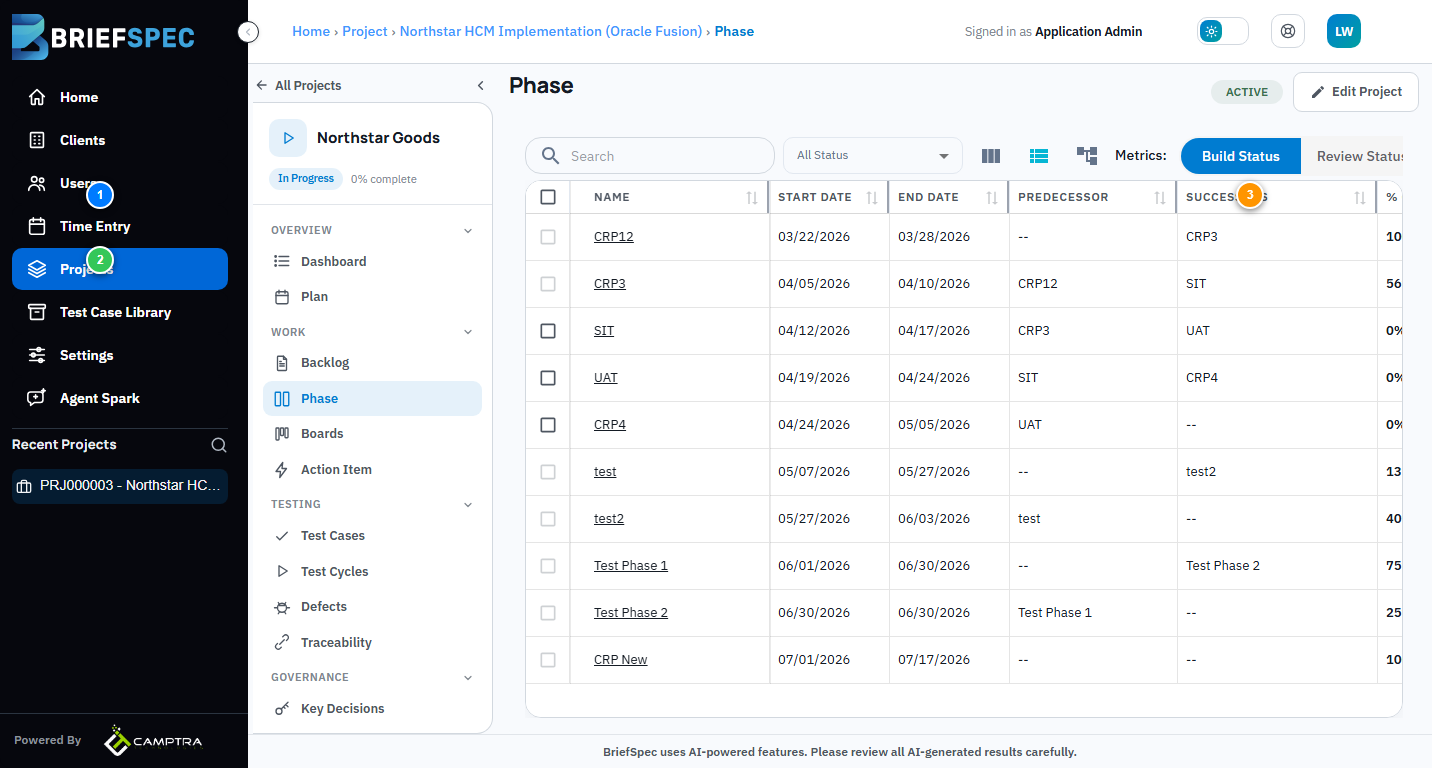
① Phase Table
The table shows each phase with its Name, Start/End Dates, Predecessor/Successor dependencies, % Completed, and Status. Phases can be sequential (CRP1 → CRP2 → SIT → UAT) or parallel. Click any phase name to view its requirements and test cases.
② Metrics: Build vs Review
Toggle between Build Status and Review Status to see two different views of progress. Build tracks how many requirements have been drafted. Review tracks how many have been verified and approved. Together they give you a quantified go/no-go signal — not gut feel.
③ Add Phase
Click Add Phase to create a new implementation phase. Each phase inherits the project software structure. You can set predecessor phases so that SIT can’t start until CRP completes, or run phases in parallel for different modules.