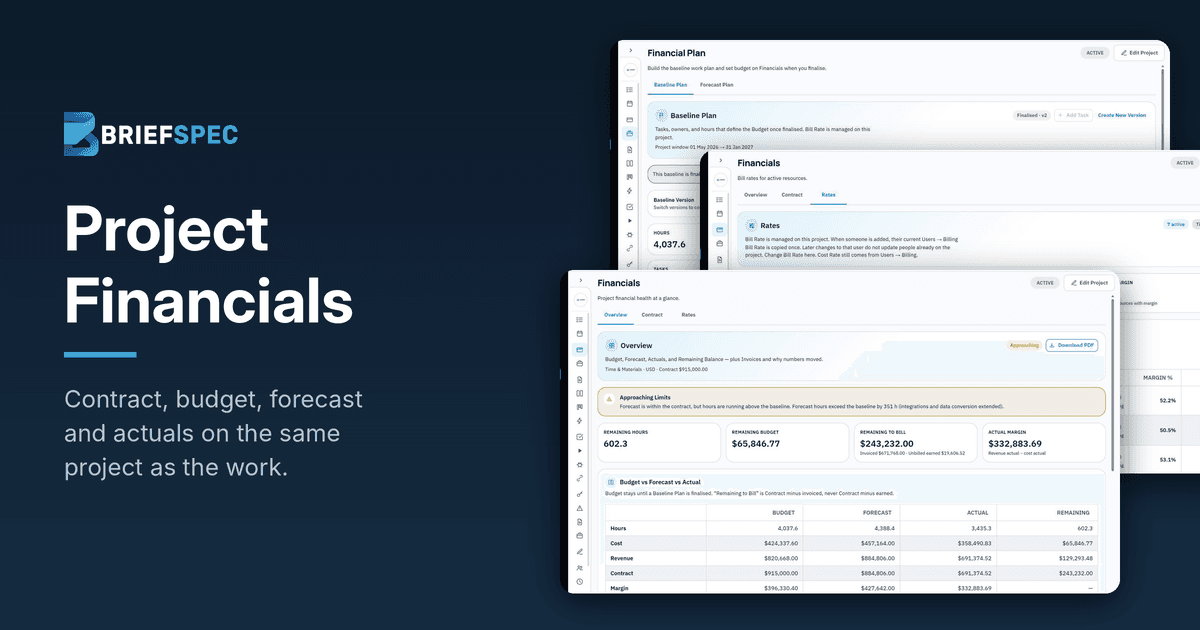
Systems integrators already use BriefSpec to run the delivery side of an implementation, from the plan and requirements through to test cycles, defects and service requests. What has been missing until now is the commercial side of those same projects, which most teams have continued to manage somewhere else. Project Financials brings the contract, rates, budget, forecast and actuals onto the same project as the work, which means a PMO can manage execution and financials in one platform.
It is built around the way an implementation is managed commercially: a contract establishes the value, a baseline plan turns that value into a budget, a forecast shows where the project is heading, and the time people log against the work provides the actuals. The rest of this article looks at each of those in turn, using a sample Oracle Cloud implementation to illustrate.
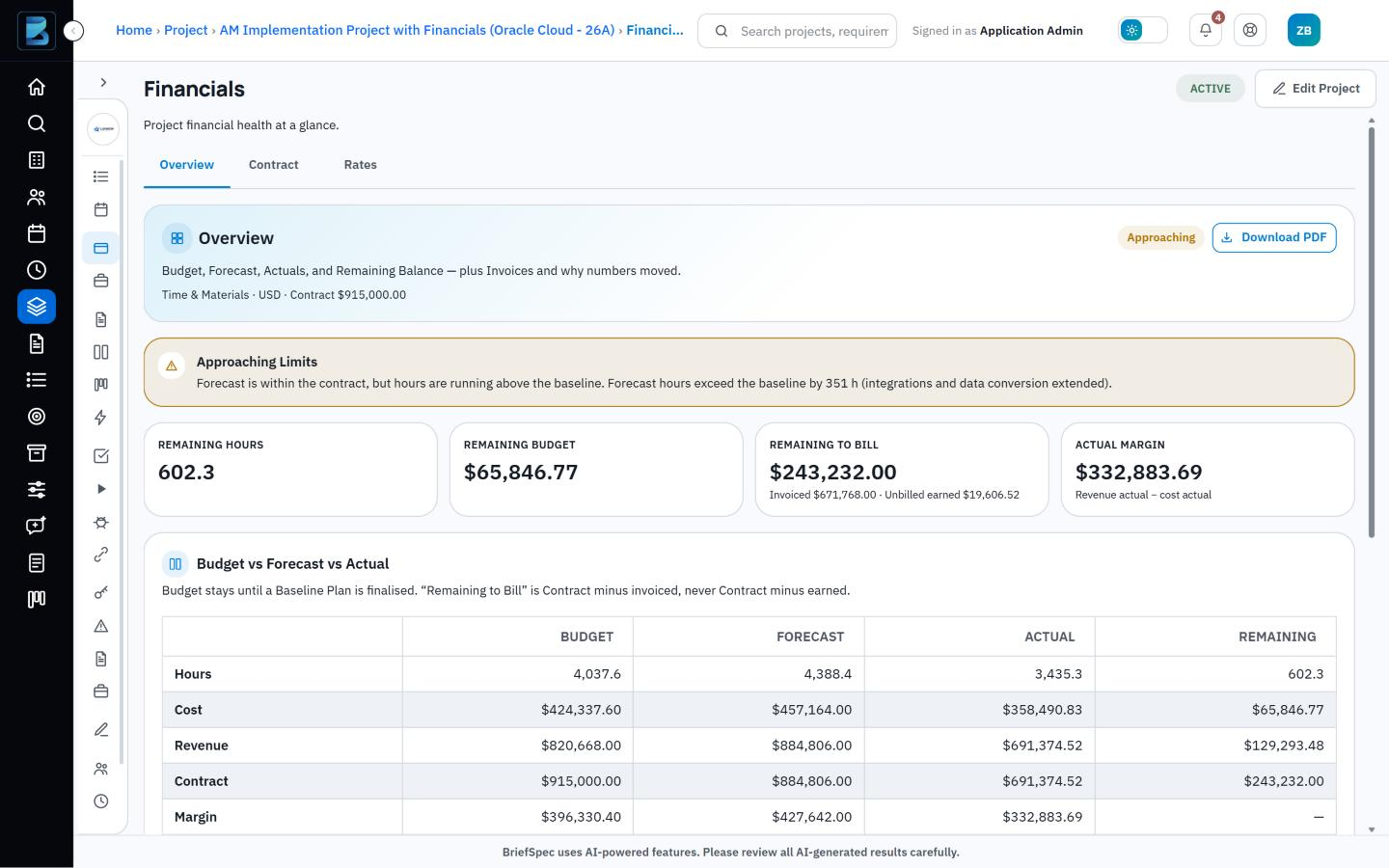
Image 1: Financials overview. Budget vs. forecast vs. actual with an Approaching Limits status.
The contract and its change orders
Everything in Project Financials starts from the contract, because the contract determines what the project is worth and how it will be billed. The project record holds the contract type, the currency and the value taken from the SOW, and it can also carry a target margin and a not-to-exceed limit where the engagement calls for one. A named budget approver reviews the contract before any of it counts, and once it has been approved the commercial terms are locked.
Of course, the value that was signed is seldom the value the project ends on. As change orders are agreed over the course of the implementation, each one is added to the contract with its amount, its effective date and a short note, and the project then shows both the current contract value and the full history of how it got there, which is useful when a client asks why the number has moved.
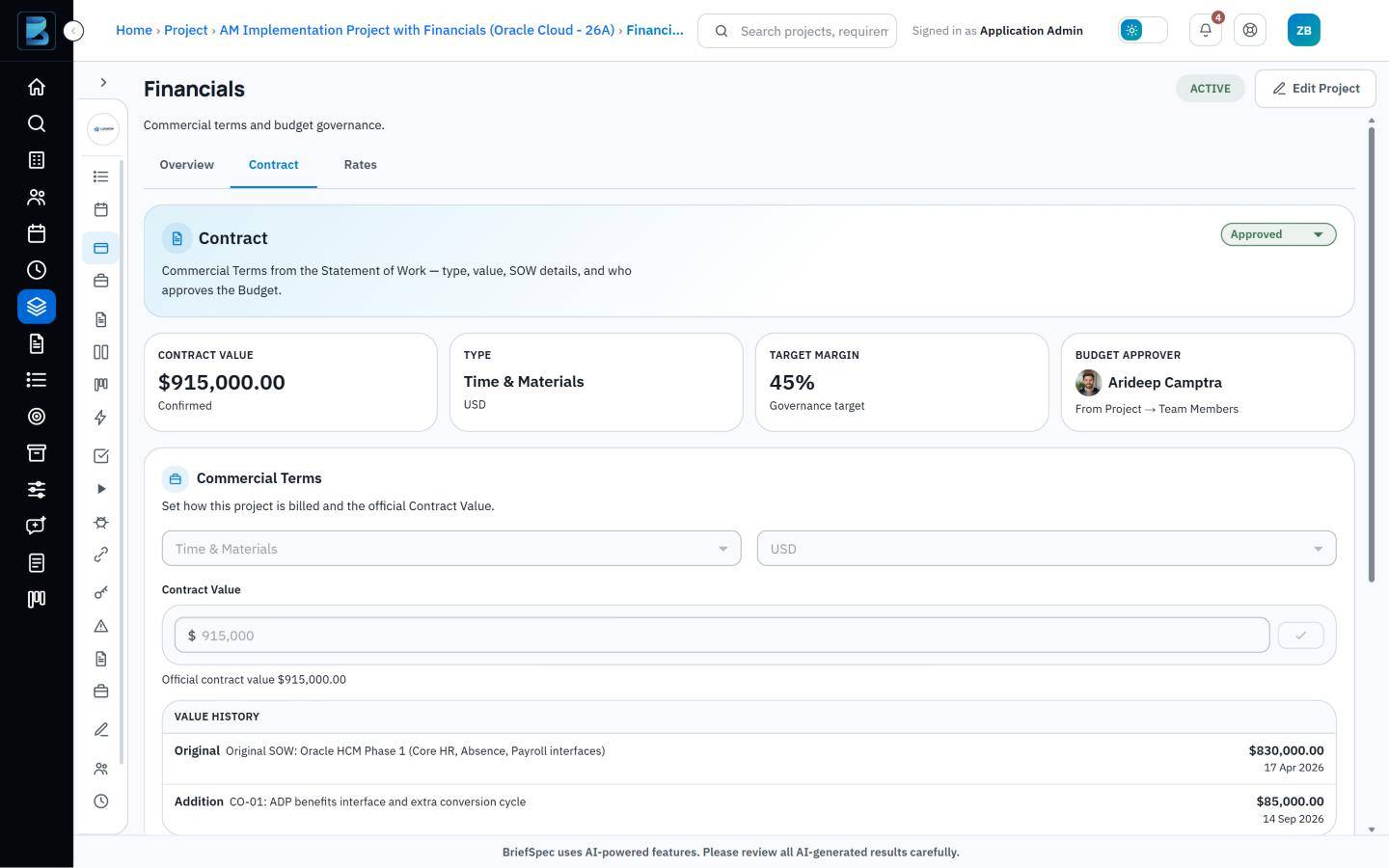 Image 2: Contract value history with two change orders, one pending approval.
Bill rates, cost rates and margin
Rates are handled in much the same way, in that BriefSpec keeps their history and never overwrites it. Each person on a project has two rates. The bill rate is set on the project itself, since the same senior consultant might bill at $200 on one engagement and $185 on another, whereas the cost rate belongs to the person and is drawn from their billing profile.
Because both rates are date-effective, a new rate takes effect from its start date and the forecast recalculates from that point onward, while the previous rate continues to apply to everything that came before. The margin reported for earlier periods therefore stays as it was when someone’s rate goes up partway through a project. Margin is also shown for each resource, which makes it easier to see how individual roles contribute to the profitability of the engagement.
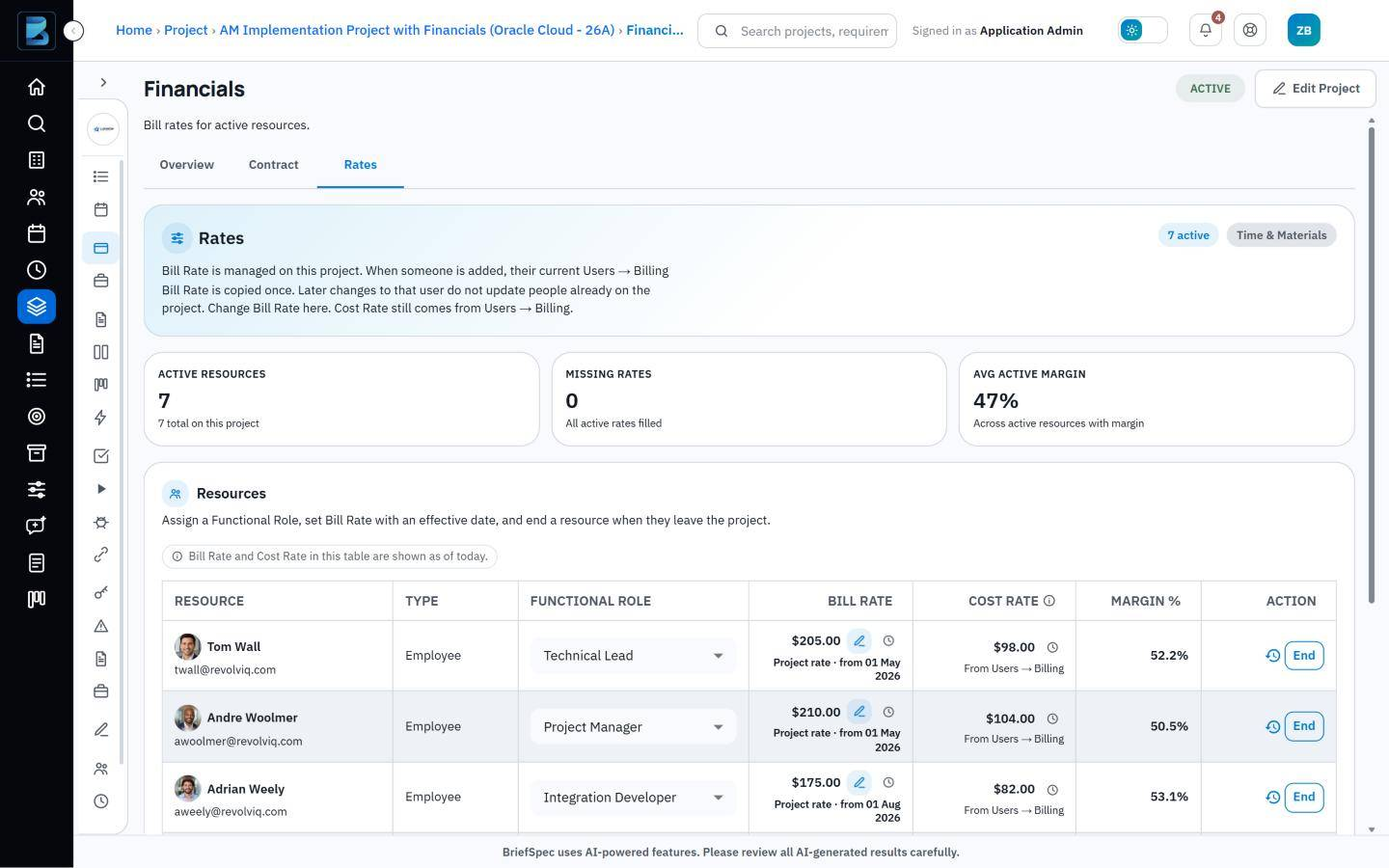
Image 3: Resource rates with margin %, plus the rate history for one consultant.
The baseline plan
With the contract and rates in place, the baseline plan sets out how the hours will be spent, broken down by task and by the person or team responsible. Some allocations are steady, with the same number of hours each week, and others are flexible, with the load rising and falling as the project moves through its phases. When the plan has been agreed it is finalized, at which point it is locked and becomes the budget against which the rest of the project is measured.
Plans do change, and when that happens a new version of the baseline is created and the earlier one is kept alongside it. The PMO can therefore always go back and show what was originally planned, what it was changed to, and when.
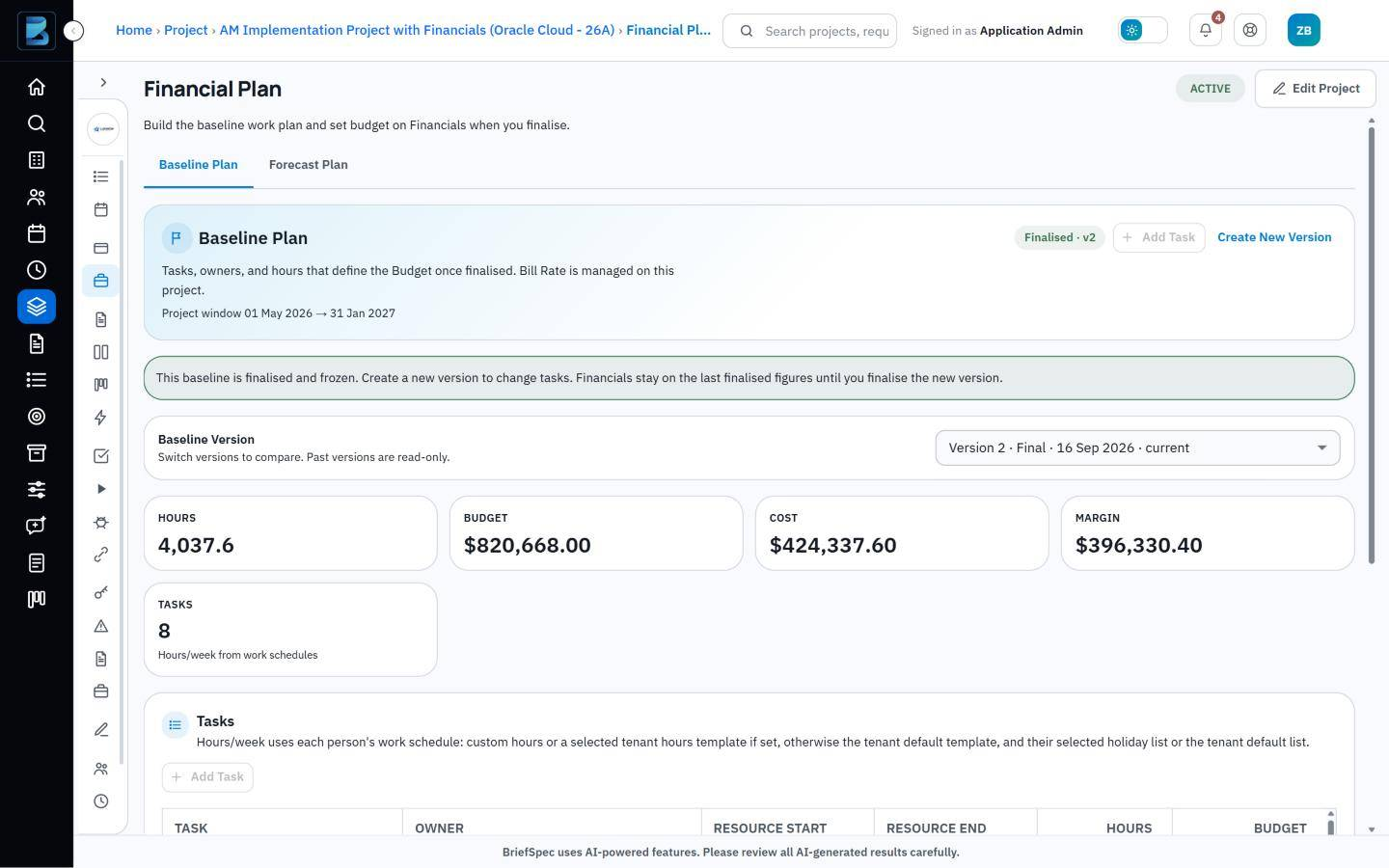
Image 4: A finalized baseline plan with tasks, owners, hours and budget.
Forecast and actuals
The forecast begins as a copy of the finalized baseline and from then on serves as the working plan, which project managers adjust as people roll on and off the project and as allocations shift from week to week.
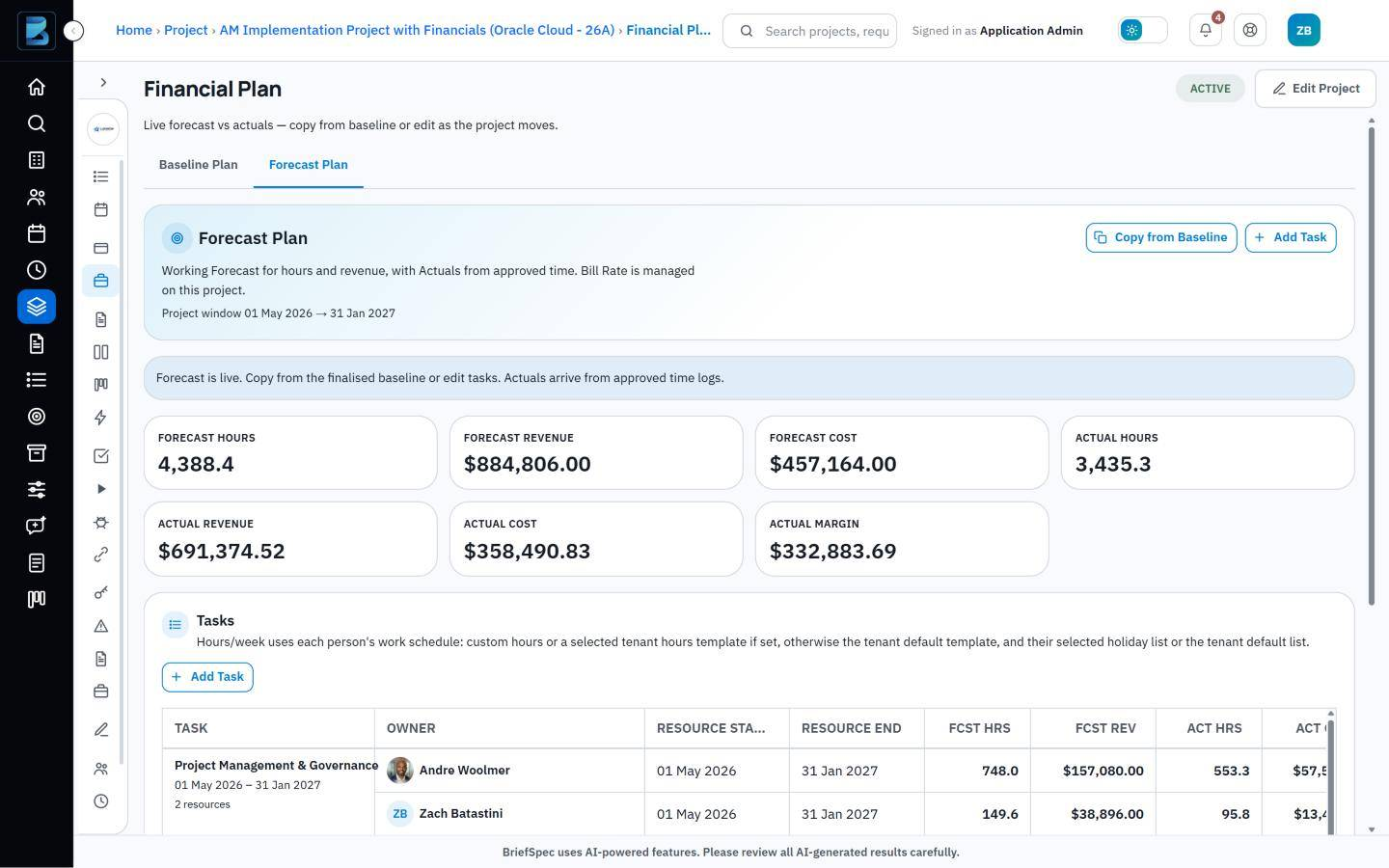
Image 5: Forecast plan with forecast hours and revenue next to actual hours and cost from approved time.
The actuals that sit alongside the forecast are generated from the time the team logs in BriefSpec against the work they are doing, whether that is a task on the financial plan, a requirement, a test case or a service request. Once the project’s Timesheet Approver has approved those entries, the hours become the project’s actual hours and cost, which means nobody has to export a timesheet or update a spreadsheet at month end to find out where the project stands.
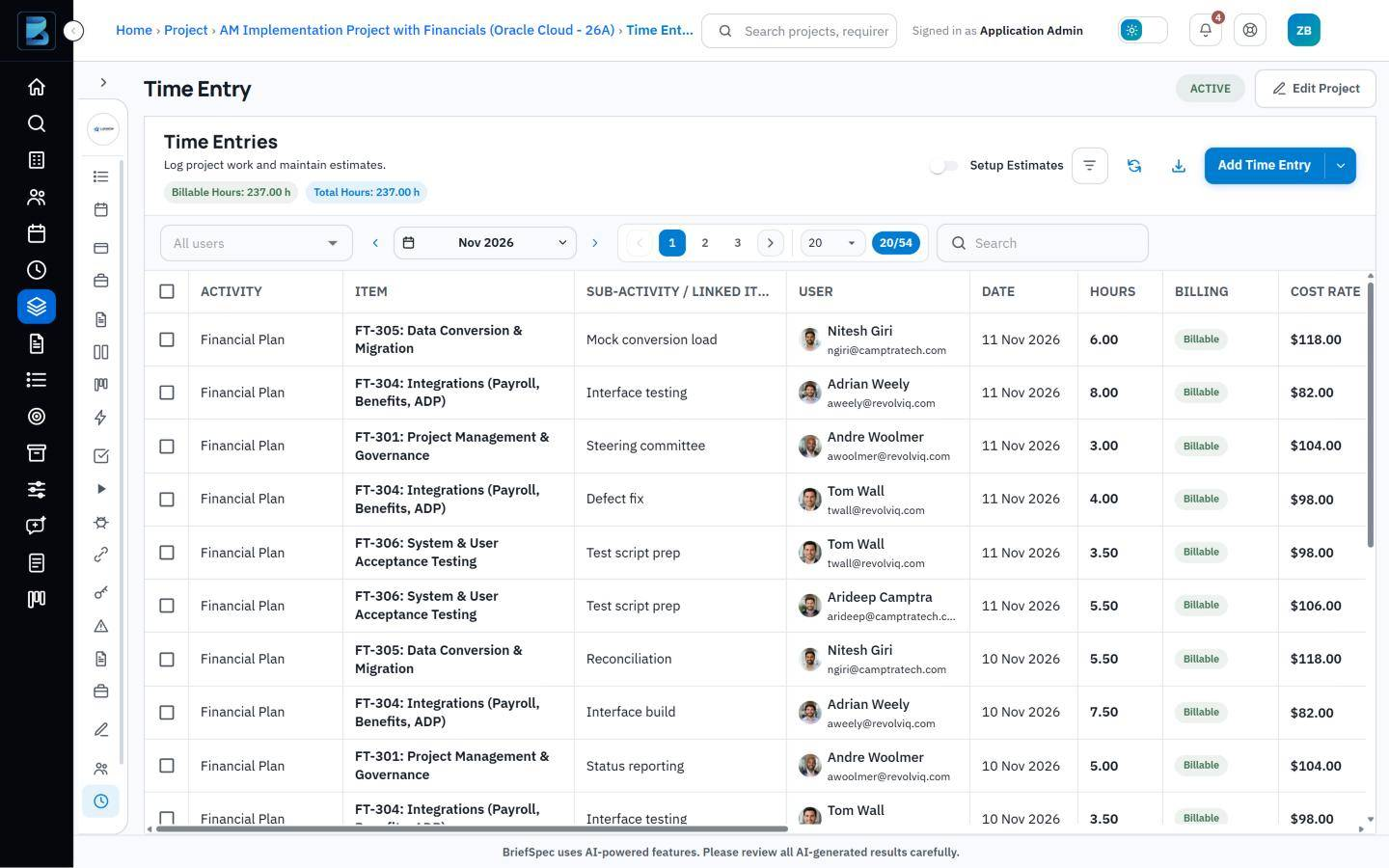
Image 6: Weekly time entry, with hours logged against plan tasks, a test case, a requirement and a service request.
The financials overview
Since the contract, the baseline, the forecast and the actuals all live on the same project, BriefSpec is able to compare them directly, and this is what the financials overview does. It sets budget, forecast and actual figures side by side for hours, cost, revenue and margin, and it shows how many hours and how much budget remain along with the amount still to be billed. A status of On Track, Approaching Limits or Over Budget summarizes the position, and the whole overview can be downloaded as a PDF when it is needed for a status report.
Invoices are recorded against the project as they go out, so the remaining-to-bill figure reflects what has been invoiced to date.
When the project changes
One of the more practical consequences of keeping everything together is that each kind of change has an obvious home. A change in scope or contract value is recorded as a change order, a rate increase is entered as a new rate with its own start date, and a change to the agreed plan becomes a new version of the baseline, while the ordinary week-to-week shifts in staffing and timing are absorbed by the forecast. In every case the earlier position is retained, so the project keeps a complete record of how it arrived at where it is today.
An example
The sample project shown in the screenshots illustrates how this works in practice. Its original SOW was signed for $830,000 in April 2026, and a change order in September added a further $85,000 for a benefits interface and an extra conversion cycle, bringing the contract value to $915,000.
The baseline plan allowed for 4,037.6 hours, but the integration and data conversion work has taken longer than expected and the forecast now stands at 4,388.4 hours, some 351 hours above the baseline. Forecast revenue of $884,806 is still within the contract, which is why BriefSpec shows the project as Approaching Limits and not yet Over Budget. To date, 3,435.3 hours have been logged, $671,768 has been invoiced and $243,232 remains to be billed.
The delivery manager can see all of this while roughly 600 of the baseline hours are still unused, which leaves enough time to adjust the scope, revise the forecast or raise a further change order.
Access to financial data
Because rates and margin are sensitive, access to them is controlled through project roles. Financials and Financial Plan are separate permissions, each of which can be set to Hidden, Read, or Read and Edit, and anyone without financial access will find that cost and bill rates are hidden from them in the time entry list. Cost rates also cannot be changed from within a project, since they are maintained on each person’s billing profile.
What is included today
This first release supports time and materials contracts, including those with a not-to-exceed limit. Fixed-fee contracts can already be recorded in BriefSpec, although fixed-fee budgeting is not yet available, and internal projects are treated as non-billable and therefore carry no budget.
Each project is tracked in a single currency, and invoices are recorded manually with a date, an amount and a note. There is no direct integration with accounting systems at this stage.
Getting started
Project Financials is included in the Business and Enterprise plans and is switched on for each project through the Track Financials setting, after which the Financials and Financial Plan pages appear under Budgeting.
If you are new to BriefSpec, you can book a demo, and we will build a baseline with you using one of your live projects so that you can see your own figures. More information is available on the Project Financials page, and you can also try BriefSpec for free.
Frequently asked questions
Which plans include Project Financials?
Project Financials is included in the Enterprise plan.
Which contract types are supported?
Time and materials contracts are supported, including those with a not-to-exceed limit. Fixed-fee contracts can be recorded, although fixed-fee budgeting is not yet available, and internal projects carry no budget.
Can a baseline plan be changed after it is finalized?
Once a baseline has been finalized it is locked. If the plan needs to change, a new version is created and the earlier version is kept for reference.
Where do actual hours and costs come from?
They come from the time that people log in BriefSpec against plan tasks, requirements, test cases and service requests, and the hours count as actuals once they have been approved.
What happens to earlier figures when someone’s rate changes?
Earlier figures are not affected. Bill and cost rates are date-effective, so a new rate applies from its start date and the previous rate continues to apply to the work that came before it.
Who can see rates and margin?
That depends on the person’s project role, because Financials and Financial Plan can each be set to Hidden, Read, or Read and Edit.
Can the financial data be exported?
The financials overview can be downloaded as a PDF, although there is no direct integration with accounting systems at this stage.